Certificates
Certificate templates and integrity hash
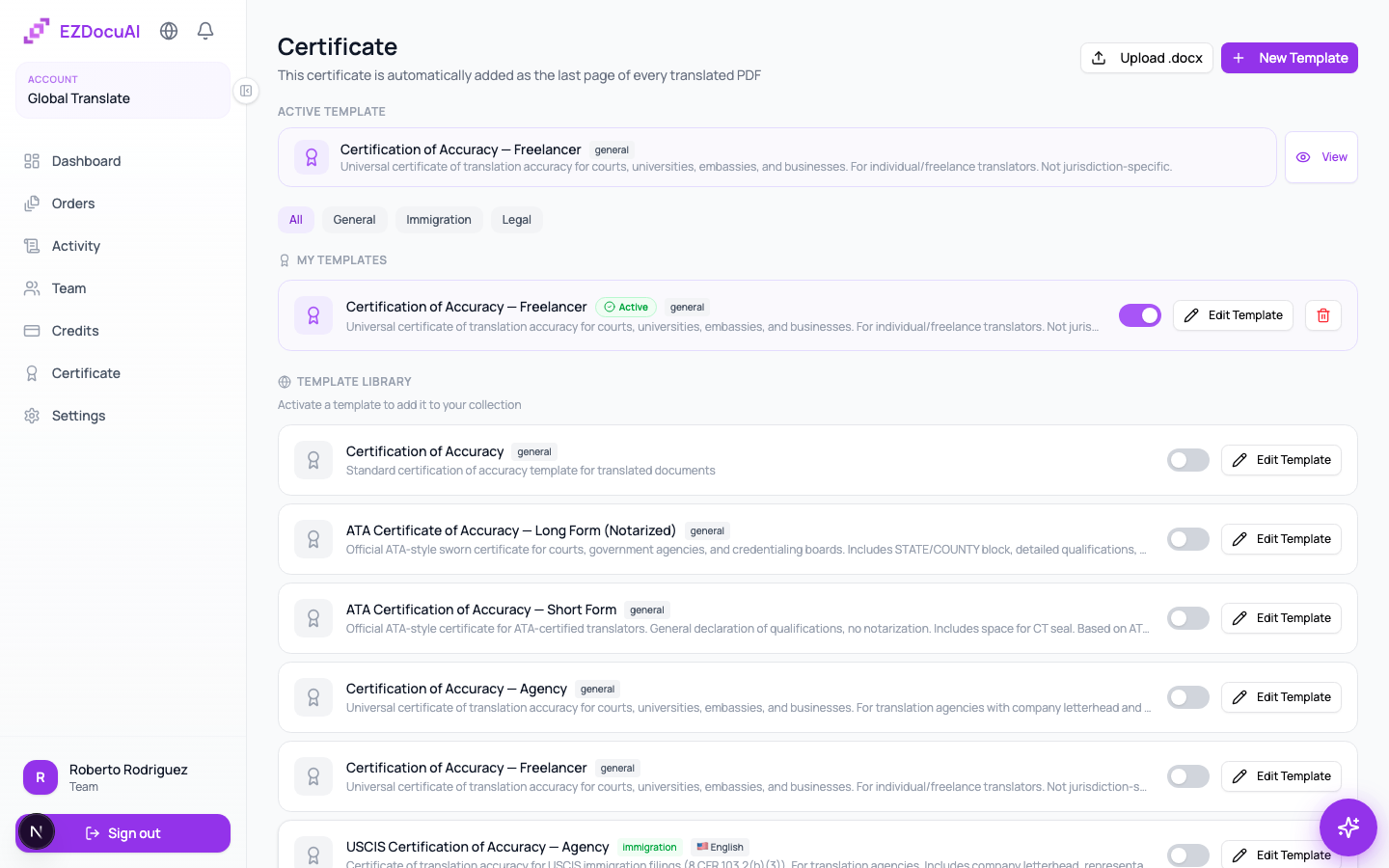
EZDocuAI does not certify translations. You do — with your own professional credentials, signature, and stamp. What EZDocuAI gives you is a configurable certificate template that gets bundled with every export, plus a SHA-256 integrity hash + public verification URL that prove the exported PDF wasn't altered after you signed it.
What ships in every export
Every PDF EZDocuAI exports for you carries:
- Your certificate page — generated from the template you configured (declaration of fidelity, your name, your translator license / association membership, your signature image, your stamp, agency logo if you set one).
- A SHA-256 integrity hash of the translated PDF. Embedded inside the file and printed on the certificate page.
- A public verification URL that anyone (recipient, embassy clerk, court official) can hit without an EZDocuAI account.
The verification URL does not assert that the translation is correct or legally valid in any jurisdiction. It only confirms one thing: "this PDF byte-for-byte matches the file the translator exported on date X under order N — it has not been tampered with since." The legal weight of the translation comes from your credentials, not from us.
Configure your template
Go to Settings → Certificate templates to customize what your certificate page looks like:
- Declaration of fidelity — the legal language required by your accreditation body. EZDocuAI ships with starter templates for the most common ones (US ATA, UK ITI, Argentine CTPCBA, Brazilian sworn translator, German § 142 ZPO sworn, French expert-traducteur), but treat them as starting points — you are responsible for your own wording.
- Your name and credentials — license number, association membership, jurisdiction.
- Signature — uploaded image (PNG with transparent background recommended). Applied to every export until you change it.
- Stamp / seal — same as signature; for jurisdictions that require a physical stamp.
- Agency logo — optional header image. Available on Team and Enterprise plans.
You can save multiple templates and pick which one applies per order (e.g. one for USCIS submissions, another for academic, another for sworn court translations).
How to download the certificate
When the order reaches Completed:
- Open the order or go to Certificate in the sidebar.
- Click Download certificate.
- Two files come bundled: the translated PDF and the certificate page (or a single combined PDF, depending on your template setting).
💡 Tip: keep the integrity hash visible on the certificate page when you submit to authorities. Some clerks check the hash against the verification URL on the spot.
Public verification
Anyone can verify integrity without accessing your account:
- Open the verification URL printed on the certificate.
- The page shows: order number, export date, SHA-256 hash, status (
validorrevoked). - Compare the hash on the page with the hash printed on the certificate (or recomputed from the PDF). If it matches, the file is intact.
This is the answer to "how do I prove this translation came from me and hasn't been altered?" — and it works whether you submitted the file digitally or printed it.
What about apostille or notarization?
EZDocuAI does not apostille or notarize. Those are administrative acts performed by a notary public or a designated authority in your jurisdiction, on top of your certified translation. They are independent of the platform.
When the receiving authority requires apostille (e.g. Hague Convention countries for foreign-issued documents), the flow is: you certify the translation as you normally would using your template, then take that certified PDF (or its printed copy with your signature/stamp) to your local notary or competent authority for the apostille step.
Acceptance by USCIS, embassies, courts
EZDocuAI cannot guarantee acceptance by any specific authority. Acceptance depends on your credentials, not the platform:
- USCIS (US immigration): accepts translations with a certifier's statement (translator name, signature, declaration of competency and fidelity). No specific accreditation required for USCIS, but the certifier statement must be there. Your certificate page covers this when configured correctly.
- Embassies and consulates: vary by country. Some require a sworn translator (e.g. Argentina CTPCBA, Brazil junta comercial, Germany § 142 ZPO, Spain MAEC). You must be one in that jurisdiction; EZDocuAI just exports a template that displays your credentials.
- Courts: typically require a sworn translator from the local registry. Same as above.
- Universities and licensing bodies: usually accept any qualified translator's certificate.
If you're unsure whether your accreditation covers a specific use case, ask the receiving authority directly — that's outside the scope of the tool.
Revoke a certificate
If you discover an error after export, you can mark the certificate as revoked so the public verification URL flags the file. Open the order, click ⋮ → Revoke certificate, add a reason (visible only to you in the audit log), and confirm. The recipient will see status: revoked if they re-check the URL.
Revocation is for situations like: spotted a mistranslation post-delivery, your client received the wrong document, your accreditation changed retroactively. It does not delete the original PDF — only flags integrity claims as no longer valid.
FAQ
Does EZDocuAI certify my translation for me? No. The certificate page bundled with every export displays your declaration and credentials. EZDocuAI signs the file's integrity (SHA-256 hash); you sign the translation's accuracy (your professional certification).
What does the verification URL prove? That the PDF the recipient holds is byte-identical to the file you exported. Not that the translation is correct or that you are accredited — those are separate questions.
How long is the verification URL active? Indefinitely while your account is active. The URL keeps working even after we delete the original PDF (30 days post-delivery), because all it validates is the hash.
Can I customize the certificate with my agency's branding? Yes — agency logo, custom colors, and custom declaration wording are available on Team and Enterprise plans.
Do I need to upload my signature every order? No. You upload it once in your template; it applies to every export using that template until you change it.